Make Enhancements To Your Pizzeria on Scratch!
Enhance your Scratch pizzeria by adding interactive toppings, an order system, scoring, animations, and sound effects to improve gameplay and user experience.


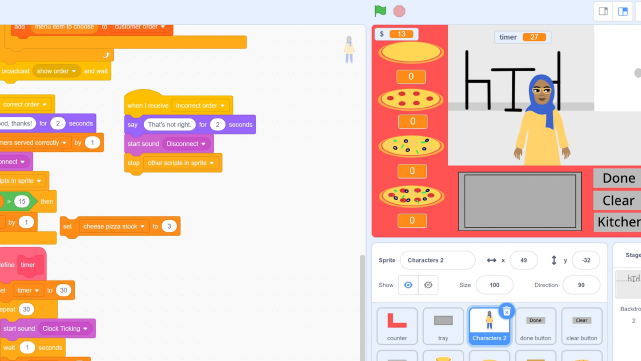

Step-by-step guide to Make Enhancements To Your Pizzeria on Scratch!
Step 1
Open your existing Scratch pizzeria project in the Scratch editor.
Step 2
Make a backup copy of your project so you can return to the original if you need to.
Step 3
Decide which interactive toppings and features to add and write a short list (for example pepperoni mushrooms an order board scoring oven animation and sound effects).
Step 4
Create a new sprite for one topping and name it "Pepperoni" by drawing or uploading a picture.
Step 5
Add code to the Pepperoni sprite so it follows the mouse while clicked by using a "when this sprite clicked" block and a "repeat until go to mouse-pointer" loop so you can drag it.
Step 6
Add code to the Pepperoni sprite that when it touches the Pizza it glides into place plays a sound and sets a variable lastTopping to "Pepperoni" then broadcasts "toppingPlaced".
Step 7
Make an Order sprite and create three costumes that show different topping requests (for example a picture of pepperoni a picture of mushrooms and a picture of pepperoni+mushrooms).
Step 8
Program the Order sprite so that when the green flag is clicked it sets a variable currentOrder to pick random 1 to 3 and switches to the matching costume to display the order.
Step 9
Create a variable Score set it to 0 at the green flag and make a script that when it receives "toppingPlaced" it compares lastTopping to currentOrder and changes Score by +10 if they match or -5 if they do not.
Step 10
Add a cooking animation to the Pizza sprite by making a few cooking costumes and a script that runs the costume changes with short waits and a sizzling sound when the correct topping is placed.
Step 11
Playtest one round of your game from order to placing topping to scoring and fix any broken scripts or placement issues you find.
Step 12
Share your finished enhanced pizzeria on DIY.org so others can see and try your game.
Help!?
I don't have any images or uploaded pictures—how can we make the 'Pepperoni' sprite for the project?
Use Scratch's paint editor to draw a circular pepperoni costume or duplicate and edit an existing sprite, name it exactly 'Pepperoni', and if you don't have a sound file use a built-in library sound like 'pop' for the placement sound.
My Pepperoni won't register touching the Pizza or the Score never updates after I place a topping—what should I check?
Confirm the Pizza sprite is named exactly 'Pizza' in your touching block, try shrinking the Pepperoni costume or add a short 'wait' after the glide so the 'touching Pizza' check succeeds, and verify the broadcast 'toppingPlaced' spelling matches the Score script.
How can I adapt the activity for much younger kids or make it more challenging for older ones?
For younger children simplify step 3 to two toppings, use 'set drag mode to draggable' instead of the repeat-until loop in step 5 and reduce scoring to +5 for correct placements, while older kids can add timers, multiple simultaneous orders, combo bonuses and more cooking-costume frames as extensions of steps 6–9.
What are quick ways to enhance or personalize the pizzeria before sharing it on DIY.org?
Add extra topping sprites and costumes, create an Order sprite that shows multiple orders on an order board, add a 'HighScore' variable updated in the scoring script from step 8, and give each topping its own cooking animation and sizzling sound before sharing on DIY.org.
Watch videos on how to Make Enhancements To Your Pizzeria on Scratch!
Make your own PIZZA GAME in scratch 3//Full Tutorial//By Mousree//game link in the description box
3 Videos

Make your own PIZZA GAME in scratch 3//Full Tutorial//By Mousree//game link in the description box
Top 6 Scratch TIPS and TRICKS! 😎 | MUST-KNOW Scratch HACKS!
Pizza Tower on Scratch.
Facts about Scratch game design
🐱 Scratch's mascot is the Scratch Cat — the platform lets kids create and share interactive projects with a huge global community.
🍕 Pepperoni is the most popular pizza topping in the United States — a tasty idea for a crowd-pleasing virtual topping!
🎮 Games with clear scoring, feedback, and goals keep players engaged longer — small rewards boost motivation.
🎵 Adding sound effects and music makes actions feel snappier; audio often helps players respond faster to events.
🖱️ Clickable, animated toppings (interactive sprites) let players customize pizzas in real time and increase playtime.
How do I enhance my Scratch pizzeria with interactive toppings, orders, scoring, animations, and sound effects?
What materials do I need to enhance a pizzeria project on Scratch?
What ages is enhancing a Scratch pizzeria suitable for?
What are the benefits of building a more interactive pizzeria in Scratch?
