Create a Stop Motion Video - A fish eating another fish
Create a short stop-motion video showing a fish eating another fish using paper or clay models, a smartphone camera, and frame-by-frame animation.


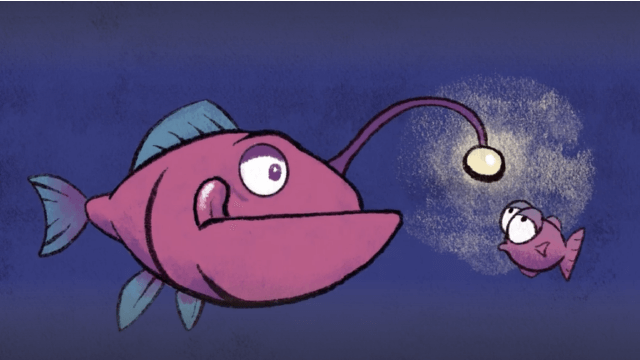

Step-by-step guide to create a stop-motion video of a fish eating another fish
Step 1
Choose whether you will make your fish from colored paper or from modeling clay.
Step 2
Clear a flat table so you have plenty of room to work and film.
Step 3
Tape a plain sheet of paper or cardboard to the table to make a simple background.
Step 4
Make two fish from your chosen material: one big fish and one small fish.
Step 5
Add eyes fins and any color details to each fish using markers or clay tools.
Step 6
Put the small fish onto the background where the action will start.
Step 7
Place the big fish a little distance away from the small fish so you can move it closer later.
Step 8
Set your camera on a stable spot or stand so it will not move during filming.
Step 9
Take the first photo to capture the starting scene.
Step 10
Move the big fish a tiny bit closer to the small fish.
Step 11
Take another photo after you move the big fish.
Step 12
Repeat moving the big fish a tiny bit and taking a photo until the big fish touches and covers the small fish.
Step 13
Use a stop motion app or photo editor to compile the photos into a video and save your movie.
Step 14
Share your finished stop-motion fish-eating video on DIY.org.
Help!?
What can we use if we don't have colored paper or modeling clay?
If you don't have colored paper or modeling clay, cut fish shapes from an old cereal box or magazine and color them with markers or shape aluminum foil into fish, then follow the same steps of placing them on the taped background and moving the big fish closer.
My stop-motion video is jumpy—what likely went wrong and how can we fix it?
If the video is jumpy, make sure the camera is set on a stable spot or stand and the background sheet is taped to the table as instructed, and put small bits of double-sided tape or blu-tack under each fish so they don't slide between photos.
How can I adapt the activity for different ages?
For preschoolers have an adult pre-cut big and small colored-paper fish and operate the camera while the child makes larger moves, and for older kids use modeling clay, add fine details with tools, and take many tiny moves per photo for smoother animation in a stop motion app.
How can we make the stop-motion movie more creative or longer?
Personalize and extend the project by taping extra paper scenery like seaweed and rocks to the background, animate fins and bubbles with small paper pieces between frames, record sound effects or narration, then compile the photos in the stop motion app and share the finished movie on DIY.org.
Watch videos on how to create a stop-motion video of a fish eating another fish
How to Make a Stop-Motion Animation | Tate Kids
4 Videos
How to Make a Stop-Motion Animation | Tate Kids
How to make Stop Motions for Beginners Part 1 (Stop Motion Tutorial)
STOP MOTION in Canva: Easy Tutorial for Eye-Catching Visuals

How to Create a Stop Motion Video in CapCut - CapCut Tutorial
Facts about stop-motion animation for kids
🐟 Many fish are carnivores — species like pike and bass eat smaller fish, so a "fish eats fish" scene is realistic!
🎬 Stop-motion animation has been used since the 1890s and powered classics like King Kong (1933) and modern favorites like Wallace & Gromit.
🎨 Clay animation (claymation) lets you reshape characters between frames, making squishy fish and gulping motions easy to animate.
📱 You can shoot stop-motion on a smartphone — at 12 frames per second, a 10-second clip needs about 120 photos.
✂️ Paper cutout animation is super kid-friendly: move paper fish bit by bit to make fun eating and chasing actions.
How do you make a stop-motion video of a fish eating another fish?
What materials do I need to make a stop-motion fish-eating video?
What ages is this stop-motion activity suitable for?
What safety tips should parents follow for this stop-motion animation activity?
