Create a 3D Spiral Staircase Using Tinkercad
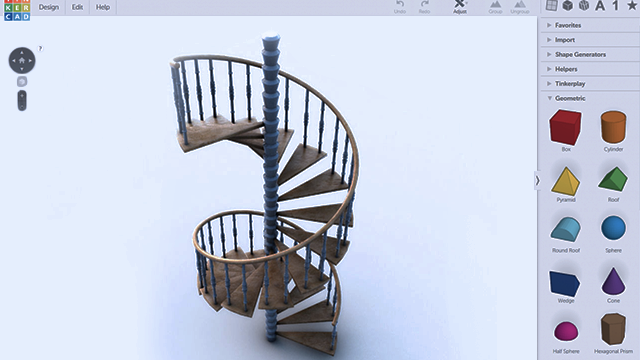
Design and build a 3D spiral staircase in Tinkercad, learning measurement, rotation, and step spacing while preparing a model for viewing or 3D printing.
About this activity
Design and build a 3D spiral staircase in Tinkercad, learning measurement, rotation, and step spacing while preparing a model for viewing or 3D printing.
What you need
Step by step
- 1
Step 1
Sign in to Tinkercad and click "Create new design" to open a fresh workplane.
- 2
Step 2
Click "Edit Grid" and set the units to millimeters so your measurements are easy and precise.
- 3
Step 3
Decide how many steps you want and the spacing: pick a number of steps (try 12) a step height (try 3 mm) and a rotation per step (try 30°) and write these values down.
- 4
Step 4
Drag a Cylinder onto the workplane to be the center pole and set its diameter to 8 mm and its height to (number of steps × step height) plus 5 mm.
- 5
Step 5
Drag a Box onto the workplane to be one stair tread and set its width to 40 mm its depth to 16 mm and its height to your chosen step height.
- 6
Step 6
Move the box so its inner short edge sits next to the center pole at a small gap (about 2–4 mm) so the steps will spiral around the pole.
- 7
Step 7
Select the step and press Duplicate (Ctrl+D) to make a copy of the step.
- 8
Step 8
Rotate the duplicated step by your chosen rotation per step (for example enter 30°) using the rotation handles so it turns around the pole.
- 9
Step 9
Raise the duplicated step up by the chosen step height using the Z arrow or the ruler number box.
- 10
Step 10
Press Duplicate (Ctrl+D) repeatedly to repeat the rotate-and-raise transform until you reach your planned number of steps.
- 11
Step 11
Select all the steps and the center pole then click Group to join them into a single model and use the ruler to check the total height and even spacing.
- 12
Step 12
Export your model as an STL if you want to 3D print or leave it saved in Tinkercad for viewing and then share your finished spiral staircase on DIY.org
Fun facts
How do I design and build a 3D spiral staircase in Tinkercad?
Start by sketching height, number of steps, and step depth. In Tinkercad, make one step (a thin box), center it on an axle (cylinder) or mark the spiral center. Use the rotate tool and duplicate (Ctrl+D) to copy the step, rotate by a fixed angle, then raise it by the step height. Repeat until complete, grouping shapes. Add a central hole or railing, check clearances, then export as STL for viewing or 3D printing.
What materials and tools do I need to create a 3D spiral staircase in Tinkercad?
You need a computer or tablet with internet, a free Tinkercad account, and a mouse or trackpad. Optional: notebook for sketches and measurements, basic ruler/calipers if you plan to 3D print, and a slicer program. For physical prints, you'll need access to a 3D printer, filament (PLA is common), and safety gear for post-processing. No special hardware is required to design and preview the model.
What ages is designing a Tinkercad spiral staircase suitable for?
This activity fits children about 8 years and up with guided instruction; younger kids (6–7) can participate with strong adult help. Teens can design independently and handle measurements, rotation concepts, and export for printing. Supervision is required for account setup and any 3D printing or post-processing steps, as printers and tools can be hot and require careful handling by adults.
What are the benefits, safety tips, or variations for this Tinkercad staircase project?
Benefits: builds spatial reasoning, measurement, rotation math, and design-for-manufacture skills. Safety: always supervise account use and any 3D printing—printers, melted filament, and tools are hot; ventilate the area. Variations: change step shape, add railings or balusters, create a double-helix or ramp, scale model for dollhouses, or design modular steps that snap together for easier printing and assembly.
Watch & Learn
Need help?
If I can't find the Cylinder shape or need a different center pole, what can I use instead?
If you can't find the Cylinder, drag a Box onto the workplane and set its width and depth to 8 mm and its height to (number of steps × step height) plus 5 mm to act as the center pole.
My duplicated steps aren't lining up or the spiral looks uneven—what should I check?
Make sure the original Box step's inner short edge is positioned 2–4 mm from the pole, then use the rotation input (enter your rotation per step, e.g., 30°) and the Z number box to raise each Ctrl+D duplicate by the exact step height so every rotate-and-raise is consistent.
How can I adapt this activity for different ages or skill levels?
For younger kids use fewer steps (try 6), a larger step height (around 5 mm), and skip precise angle entries, while older kids can use more steps (e.g., 24), smaller heights (2–3 mm), add a handrail with thin Boxes or Cylinders, and export the STL to 3D print.
What are simple ways to extend or personalize the spiral staircase project?
Personalize by coloring individual treads in Tinkercad, adding a handrail made from a thin Cylinder and balusters (small Cylinders or Boxes) around the outer edge, hollowing the pole, or engraving text on steps before exporting the STL.