Perform the Y-Perm Algorithm on Your Cube
Learn and practice the Y-Perm algorithm on a 3x3 Rubik's Cube to swap two corners and two edges, improving recognition and finger dexterity.
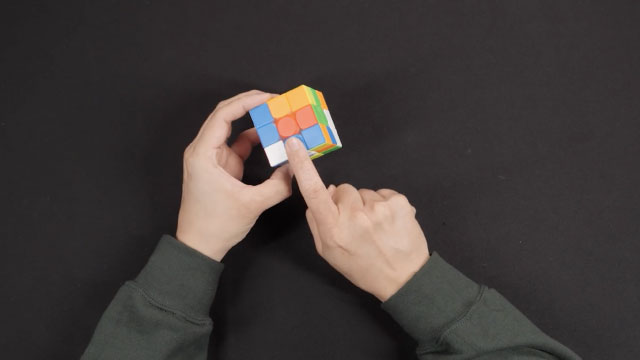
About this tutorial
Learn and practice the Y-Perm algorithm on a 3x3 Rubik's Cube to swap two corners and two edges, improving recognition and finger dexterity.
What you need
Step by step
- 1
Step 1
Pick up your 3x3 Rubik's Cube and find a comfy quiet spot to work.
- 2
Step 2
Hold the cube with the white face on the bottom and the green face facing you.
- 3
Step 3
Put the corner you want to swap into the upper-front-right position (the corner on the top layer closest to you on the right).
- 4
Step 4
Read and memorize this exact Y-Perm move sequence: F R U' R' U' R U R' F' R U R' U' R' F R F'.
- 5
Step 5
Slowly perform the full Y-Perm algorithm one move at a time while saying each move out loud.
- 6
Step 6
Look carefully at the top layer and the front and back edges to see which two corners and two edges were swapped.
- 7
Step 7
Repeat the Y-Perm algorithm five times in a row to practice smooth, quick finger turns.
- 8
Step 8
Practice the algorithm with relaxed wrists and small finger flicks to build faster finger dexterity.
- 9
Step 9
Rotate the top layer (U) to place a different pair of corners into the upper-front-right spot and perform the Y-Perm again to test recognition.
- 10
Step 10
Keep practicing until you can do the algorithm smoothly three times in a row without stopping.
- 11
Step 11
Share a short description or photo of your practice and what you learned on DIY.org.
Fun facts
How do you perform the Y‑Perm algorithm on a Rubik's Cube?
To perform the Y‑Perm, orient the cube so the two corners to be swapped sit at the front-right positions and the corresponding edges are aligned. Execute the algorithm: F R U' R' U' R U R' F' R U R' U' R' F R F'. Practice slowly to watch how corners and edges move, learn efficient finger tricks for U/R/F turns, then repeat until the sequence is smooth and consistent.
What materials do I need to practice the Y‑Perm?
You need a standard 3x3 Rubik's Cube (stickered or stickerless), a printed or digital notation guide to read algorithms, and a timer or stopwatch to track progress. Optional items: a speedcube with lubrication for smoother turns, a practice sheet to record times, and quiet workspace with good lighting so young learners can focus and see sticker colors clearly.
What ages is learning the Y‑Perm suitable for?
Learning Y‑Perm is generally suitable for children aged about 7 and up, once they can follow multi‑step instructions and have basic finger control. Younger kids (5–6) can try with close adult guidance and simplified explanations. Older children and teens also benefit. Adjust expectations: start slowly, emphasize accuracy over speed, and use short practice sessions to match attention span.
What are the benefits of practicing the Y‑Perm on a cube?
Practicing Y‑Perm builds pattern recognition, short‑term memory, and sequencing skills while improving fine motor control and finger dexterity. It also teaches patience, error checking, and algorithmic thinking useful in STEM learning. Regular short practice boosts speed and confidence without overwhelming the child—encourage breaks to avoid hand fatigue and keep sessions fun with timed challenges or friendly competitions.
Watch & Learn
Need help?
What can we use if we don't have a 3x3 Rubik's Cube or can't use DIY.org to share our practice?
If you don't have a 3x3 Rubik's Cube, use a smartphone Rubik's Cube simulator app or an inexpensive 3x3 toy so you can still hold the cube with the white face on the bottom and green face facing you, and if DIY.org isn't available upload your photo and description to a family chat or email.
Why does the Y-Perm not seem to work when I follow the sequence, and how do I fix it?
If the Y‑Perm doesn't produce the expected corner and edge swaps, check that the corner to swap is in the upper-front-right position and that the cube is held with the white face down and green facing you, then redo the algorithm slowly one move at a time while saying each move out loud to catch mistakes.
How can I adapt this activity for different ages or skill levels?
For young kids, break the Y‑Perm move sequence into 2–3–move chunks and practice just one chunk at a time saying moves out loud, while older kids can speed up by doing the full sequence five times in a row and working on small finger flicks for dexterity.
What are simple ways to extend or personalize the exercise after I can do the Y-Perm three times smoothly?
To extend the activity, time yourself doing three smooth repetitions, rotate the U layer to place different corner pairs into the upper-front-right spot as instructed, try swapping cube stickers for personalization, and then share a photo and what you learned on DIY.org.